
基本概念
CI/CD
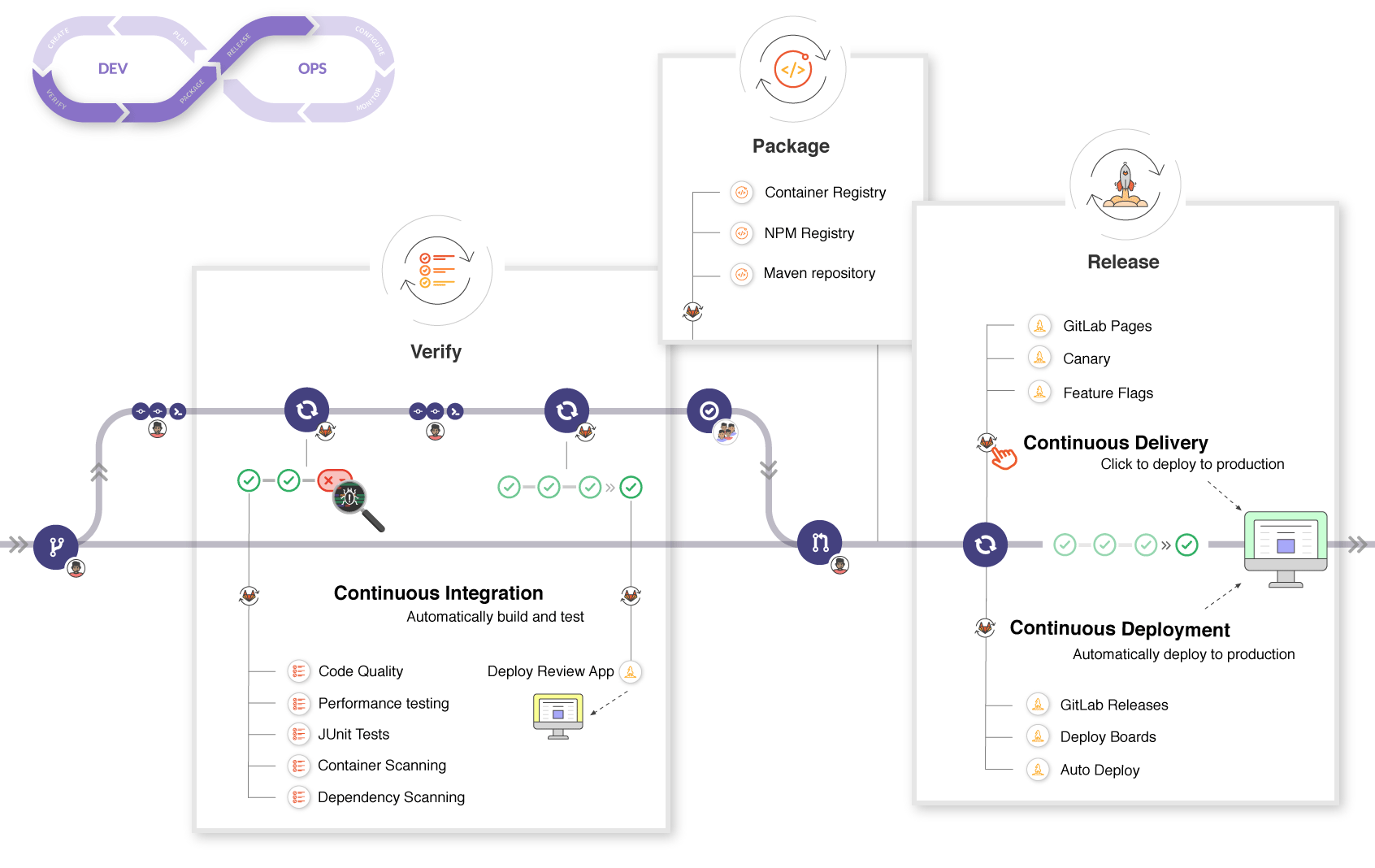
Continuous Integration
持续集成。
代码的每次 push/merge 都会触发工程的构建、测试,从而保证变更的代码能够通过测试,且符合代码规范,减少出问题的风险。
Continuous Deployment
持续部署。
持续集成之后,代码自动部署到环境中。
Continuous Delivery
持续交付。
手动交付、部署代码。
gitlab CI/CD 工作流
CI/CD 主要步骤:
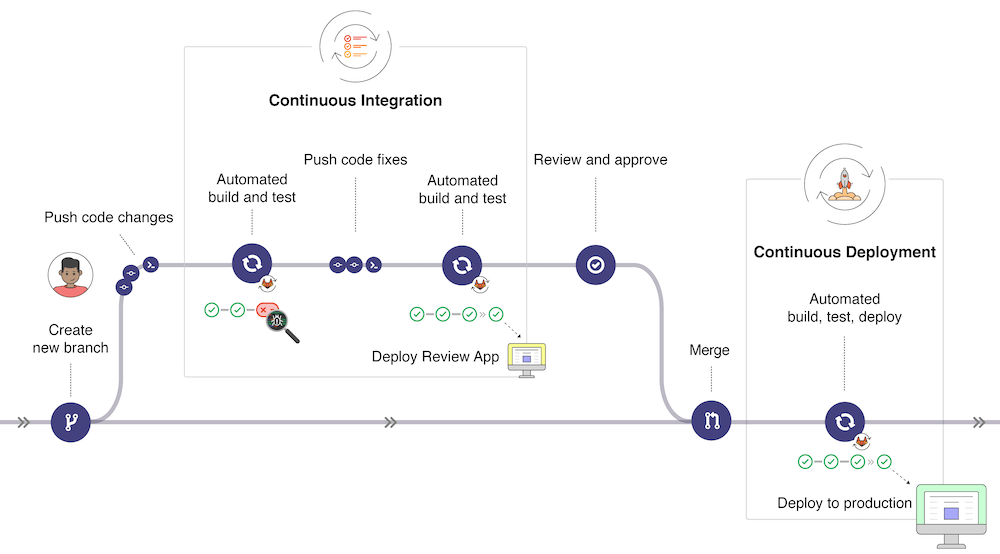
每个阶段可执行多个任务:
Pipelines 流水线
Pipelines 是 CI/CD 的最高级的抽象
为什么要 CI/CD
CI/CD 能够自动对你的代码进行构建、测试、部署,这样能够及时发现开发过程中的各种问题,如代码规范、安全风险等,以及保证整条链路符合预期,如构建结果、构建速度。
Pipelines 流水线
Pipelines 是 CI/CD 的最高级的抽象,通过.gitlab-ci.yml文件定义一系列连续的任务。
Pipelines & Stages & Jobs 之间的关系
- 一条 Pipeline 由多个 Jobs 和多个 Stages 组成;
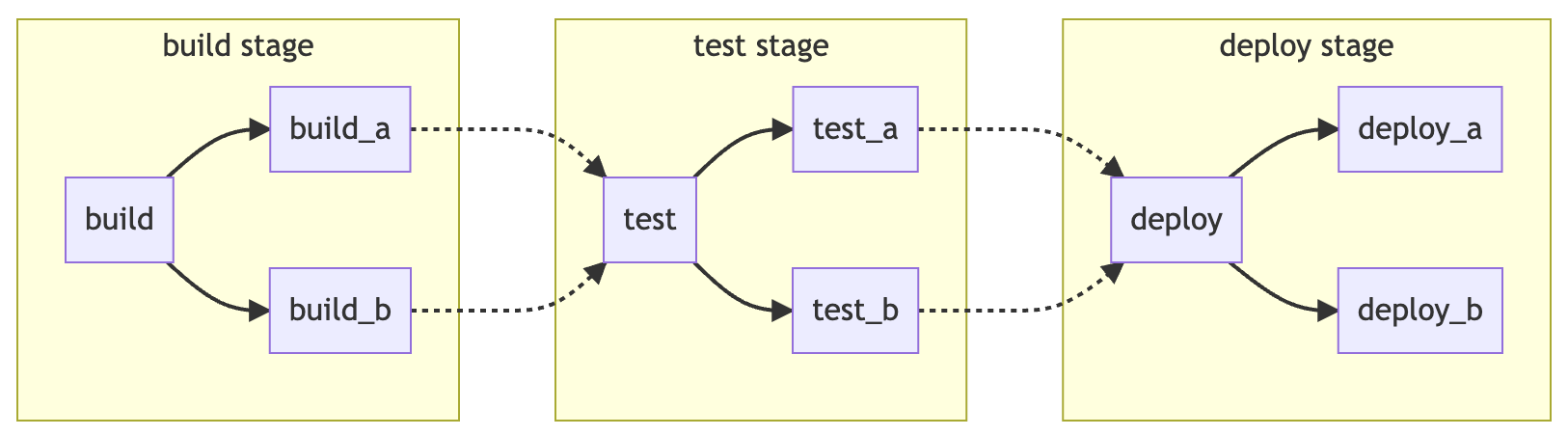
- 处于 同一个 Stage 的 Jobs 并行地执行;
- 当一个 Stage 的 Jobs 全部执行成功后,Pipeline 进入到下一个 Stage;当有 Job 执行失败时,todo;
- 不同 Stage 中的 Jobs 并不一定按照 Stage 的顺序执行,如 DAG 架构中,明确了依赖关系的 Jobs 会尽可能快的执行;
.gitlab-ci.yml
info
在项目根目录下,添加.gitlab-ci.yml文件,即可开始接入 gitlab CI/CD
.gitlab-ci.yml
stages: # List of stages for jobs, and their order of execution
  - build
  - test
  - deploy

build-job:
  stage: build
  script:
    - echo "Hello, $GITLAB_USER_LOGIN!"

test-job1:
  stage: test
  script:
    - echo "This job tests something"

test-job2:
  stage: test
  script:
    - echo "This job tests something, but takes more time than test-job1."
    - echo "After the echo commands complete, it runs the sleep command for 20 seconds"
    - echo "which simulates a test that runs 20 seconds longer than test-job1"
    - sleep 20

deploy-prod:
  stage: deploy
  script:
    - echo "This job deploys something from the $CI_COMMIT_BRANCH branch."
.gitlab-ci.yml 常用的关键字
- 全局关键字
stages定义 Stages
- Jobs 配置关键字
- xx
tip
更多.gitlab-ci.yml 配置关键字见:https://docs.gitlab.com/ee/ci/yaml/index.html
stages
可以定义流水线的阶段
job
每个 job 都定义了在什么 stage 执行,以及要执行的命令行脚本
预定义变量
gitlab 预定义了$GITLAB_USER_LOGIN 、$CI_COMMIT_BRANCH等变量,这样脚本 CI/CD 流程执行时,可以获取到当前提交的上下文信息,从而支持更灵活的任务。
常用的 predefinded variables
$GITLAB_USER_LOGINgit 用户名$CI_COMMIT_BRANCH分支名$CI_COMMIT_MESSAGEcommit message$CI_DEFAULT_BRANCH当前项目的默认分支
流水线结构
有三种典型结构:
- 基本结构
- 有向无环图结构
- 父子结构
一个 Stage 的 Jobs 并行的执行,全部执行完后进入下一个 Stage ,这是 gitlab 中最基本的结构。虽然简单易维护,但是工程复杂后可能会比较低效。
stages:
  - build
  - test
  - deploy

image: alpine

build_a:
  stage: build
  script:
    - echo "This job builds something."

build_b:
  stage: build
  script:
    - echo "This job builds something else."

test_a:
  stage: test
  script:
    - echo "This job tests something. It will only run when all jobs in the"
    - echo "build stage are complete."

test_b:
  stage: test
  script:
    - echo "This job tests something else. It will only run when all jobs in the"
    - echo "build stage are complete too. It will start at about the same time as test_a."

deploy_a:
  stage: deploy
  script:
    - echo "This job deploys something. It will only run when all jobs in the"
    - echo "test stage complete."

deploy_b:
  stage: deploy
  script:
    - echo "This job deploys something else. It will only run when all jobs in the"
    - echo "test stage complete. It will start at about the same time as deploy_a."
使用 `needs` 关键字明确 Jobs 间的依赖关系,可以让流水线尽可能快的执行,无需等待 Stage 中所有 Jobs 完成再进入下一个 Stage。
如下面的例子,build_a -> test_a -> deploy_a 可以尽可能快地执行完,而无需等待 b 相关的 Jobs 的状态。
stages:
  - build
  - test
  - deploy

image: alpine

build_a:
  stage: build
  script:
    - echo "This job builds something quickly."

build_b:
  stage: build
  script:
    - echo "This job builds something else slowly."

test_a:
  stage: test
  needs: [build_a]
  script:
    - echo "This test job will start as soon as build_a finishes."
    - echo "It will not wait for build_b, or other jobs in the build stage, to finish."

test_b:
  stage: test
  needs: [build_b]
  script:
    - echo "This test job will start as soon as build_b finishes."
    - echo "It will not wait for other jobs in the build stage to finish."

deploy_a:
  stage: deploy
  needs: [test_a]
  script:
    - echo "Since build_a and test_a run quickly, this deploy job can run much earlier."
    - echo "It does not need to wait for build_b or test_b."

deploy_b:
  stage: deploy
  needs: [test_b]
  script:
    - echo "Since build_b and test_b run slowly, this deploy job will run much later."
流水线的执行
自动触发
通过 API 触发
拥有权限,需要获取 token
Jobs
todo